The mechanical keyboard market in 2026 looks nothing like it did even two years ago. Hall effect switches, rapid trigger, 8,000 Hz polling rates, and gasket-mounted builds under $50 have gone from bleeding-edge curiosities to baseline expectations across the price range. The technology is moving fast — and the keyboards worth buying today reflect that shift.
Whether you’re a competitive gamer chasing every millisecond of input speed or a developer who spends ten hours a day typing, this guide covers the best mechanical keyboards you can buy right now — organized by use case, with honest tradeoffs for each pick.
Table of Contents
What Is a Mechanical Keyboard?
A mechanical keyboard is a keyboard that uses individual physical switches beneath each key, rather than a single rubber membrane sheet. Each keypress activates a dedicated spring-loaded or magnetic mechanism, which provides distinct tactile feedback and consistent actuation across millions of presses.
Unlike membrane keyboards where keys can feel mushy and inconsistent over time, mechanical boards maintain their feel for years. That durability and precision is why they’ve become the default choice for both competitive gaming and professional typing.
Quick Comparison: All 10 Picks at a Glance
| Keyboard | Best For | Layout | Switches | Connection | Polling Rate | Price |
|---|---|---|---|---|---|---|
| Wooting 80HE | Overall | 75% | Hall Effect (Lekker V2) | Wired | 8,000 Hz | $200–$245 |
| Razer Huntsman V3 Pro TKL | Competitive Gaming | TKL | Analog Optical Gen-2 | Wired | 8,000 Hz | $220 |
| ASUS ROG Strix Scope II 96 | Wireless All-Rounder | 96% | ROG NX Snow (Hot-swap) | Tri-mode | 1,000 Hz | $159 |
| Corsair Vanguard Pro 96 | Premium Hall Effect | 96% | MGX Hyperdrive | Wired | 8,000 Hz | $230 |
| Keychron Q5 Max | Productivity | 96% | Gateron Jupiter (Hot-swap) | Tri-mode | 1,000 Hz | $200 |
| NuPhy Field75 HE | Compact Gaming | 75% | Hall Effect | Wired | 8,000 Hz | $150–$179 |
| Gamakay × NaughShark NS68 | Budget Hall Effect | 65% | Hall Effect | Wired | 8,000 Hz | $44 |
| Keychron C3 Pro | Budget Mechanical | TKL | Gateron G Pro Red | Wired | 1,000 Hz | $44 |
| ZSA Voyager | Ergonomic | Split Columnar | Choc V2 (Hot-swap) | Wired | 1,000 Hz | $365 |
| Logitech MX Mechanical | Quiet Office | Full-size | Low-Profile Tactile | Tri-mode | — | $150 |
Best Mechanical Keyboards For Gamers and Home Office
Many people who want to buy keyboards for gaming activities face a lot of problems with the regular ones available in the market. For such rigorous activities, you need the best mechanical keyboards that have excellent precision, and last for a longer duration compared to regular models.
Now let me walk you through each one and why it earned its spot.
Best Overall: Wooting 80HE
Price: $200 (plastic case) / $245 (zinc alloy case) Layout: 75% (84 keys) Switches: Lekker L60 V2 Hall Effect Connection: Wired USB-C Polling Rate: 8,000 Hz (true per-key scanning)
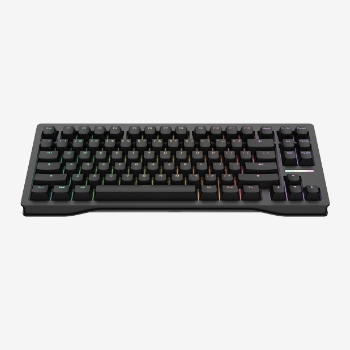
The Wooting 80HE is the keyboard I’d recommend if you could only buy one board. It dominates for a reason — 13.4% of tracked professional esports players use it, which is a remarkable adoption rate for a single model.
What makes it special is the Lekker V2 hall effect switches. These use magnets instead of metal contacts, which means you can adjust the actuation point of every single key from 0.1 mm to 4.0 mm. Set your WASD keys feather-light for rapid strafing. Set your ability keys deeper to avoid accidental presses. It’s that precise.
Rapid trigger is where this keyboard truly shines. Traditional switches need the key to travel back to a fixed reset point before you can press again. With rapid trigger, the reset happens almost instantly — at 0.1 mm of upward movement. In fast-paced shooters, this translates to noticeably quicker counter-strafes and direction changes.
The build quality matches the tech. Silicone gasket mounting, a polycarbonate switch plate, and screw-in stabilisers give it a softer, quieter typing feel than you’d expect from a gaming board. Woot’s software, Wootility, is genuinely excellent — clean, fast, and runs locally without cloud dependencies.
The catch: It’s wired only. If wireless freedom matters to you, this isn’t it. But for raw gaming performance and typing feel combined, nothing else comes close right now.
Suggested Read: Best Bluetooth Keyboards To Buy From Market For iPad Pro
Best for Competitive Gaming: Razer Huntsman V3 Pro TKL
Price: ~$220 Layout: TKL (tenkeyless) Switches: Razer Gen-2 Analog Optical Connection: Wired USB-C Polling Rate: 8,000 Hz
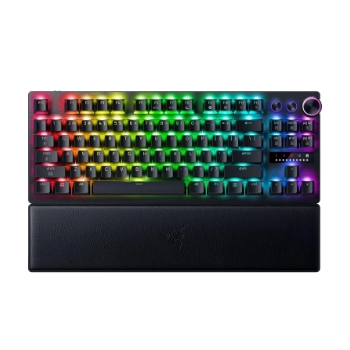
The Razer Huntsman V3 Pro TKL holds the single highest adoption rate among professional esports players — over 15% of tracked pros use it. That’s not marketing. That’s competitive players choosing it when money and rankings are on the line.
Razer’s Gen-2 Analog Optical switches offer the same core features as the Wooting — adjustable actuation from 0.1 to 4.0 mm, rapid trigger, and analog input. The media dial at the top doubles as an on-the-fly actuation adjustment knob, which is a clever touch for tournament settings where you might want to tweak sensitivity between rounds.
The brushed aluminum top plate and doubleshot PBT keycaps feel premium. Build quality is solid. This is a board that can handle being thrown into a tournament bag regularly.
The catch: I have to be transparent here. Some users have reported RGB coil whine on roughly 15–30% of units — an audible buzzing from the LEDs. Razer’s Synapse 4 software has also had profile-wiping bugs. These aren’t dealbreakers for everyone, but they’re worth knowing. I’d suggest buying from a retailer with easy returns, just in case you hit the coil whine lottery.
My take: If you’re primarily a competitive FPS player, the Huntsman V3 Pro TKL is purpose-built for that use case. For mixed gaming and typing, I’d lean toward the Wooting.
Best Wireless All-Rounder: ASUS ROG Strix Scope II 96 Wireless
Price: ~$159 Layout: 96% (90 keys) Switches: ROG NX Snow Linear (Hot-swappable, 5-pin) Connection: 2.4 GHz / Bluetooth 5.1 / USB-C wired Polling Rate: 1,000 Hz Battery: 667 hours (Bluetooth) / 222 hours (2.4 GHz)
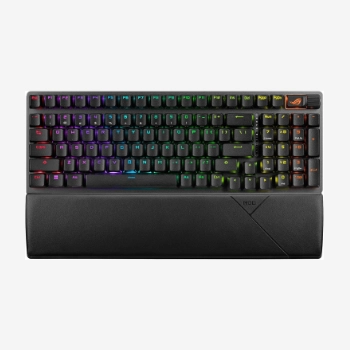
If you want a wireless keyboard that genuinely handles both gaming and office work without compromise, the Strix Scope II 96 is remarkably hard to beat at $159.
That 96% layout is the key differentiator here. You get a full numpad, arrow keys, and a function row — everything a productivity user needs — packed into a footprint barely wider than a TKL. I find the 96% layout ideal for people who switch between spreadsheets and gaming sessions without wanting two separate keyboards.
The battery life numbers are absurd. 667 hours on Bluetooth means you’re charging this thing a few times a year, not a few times a month. Even on the faster 2.4 GHz connection, 222 hours is generous.
The ROG NX Snow switches come pre-lubed and are hot-swappable with standard 5-pin compatibility. So if you outgrow the stock linears, you can swap in any MX-compatible switches without soldering.
The catch: This is a traditional mechanical keyboard — no hall effect, no rapid trigger. The 1,000 Hz polling rate is the competitive standard, but it’s not the 8,000 Hz that dedicated gaming boards now offer. For casual to mid-level competitive gaming, you won’t notice the difference. For pro-level FPS play, the Wooting or Razer is a better fit.
Suggested Read: Best Accessories For iPad Pro (2020 Edition) To Buy Right Away
Best Premium Hall Effect: Corsair Vanguard Pro 96
Price: ~$230 Layout: 96% Switches: MGX Hyperdrive Linear (Hall Effect) Connection: Wired USB-C Polling Rate: 8,000 Hz
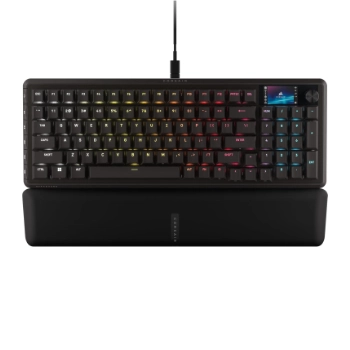
Corsair entered the hall effect market aggressively with the Vanguard Pro 96, and the feature list is stacked. You get rapid trigger, adjustable actuation (0.1–4.0 mm), SOCD controls, and Corsair’s FlashTap — all the competitive essentials.
What sets this apart from the Wooting is the extras. A small LCD screen on the board doubles as a virtual Stream Deck when paired with Corsair’s iCUE software. Six dedicated G-keys for macros, a rotary dial, and the 96% layout give you the numpad that most gaming boards sacrifice.
The MGX Hyperdrive switches feel smooth and consistent. The 8,000 Hz polling rate matches the best in the market. If you’re already in the Corsair ecosystem with their mice and headsets, the unified iCUE control is a genuine advantage.
The catch: At $230, the plastic chassis feels underwhelming for the price. The Wooting’s zinc alloy case at $245 feels substantially more premium. And iCUE, while powerful, is a heavy software suite compared to Wootility’s lightweight approach.
Best for Productivity: Keychron Q5 Max
Price: ~$200 Layout: 96% (97 keys) Switches: Gateron Jupiter (Hot-swappable) Connection: 2.4 GHz / Bluetooth 5.1 / USB-C wired Polling Rate: 1,000 Hz
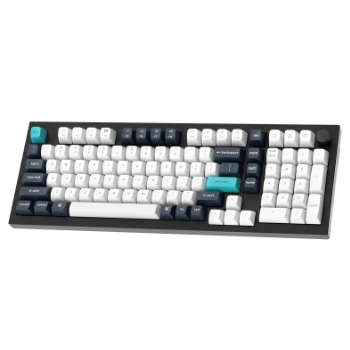
If typing quality and customisation matter more to you than rapid trigger, the Keychron Q5 Max is the board I’d point you toward. I’ve always appreciated Keychron’s approach — they build keyboards for people who type all day, not just people who game all night.
The full CNC aluminum case gives it a heft and solidity that plastic gaming boards can’t match. The gasket mount design absorbs the impact of each keystroke, producing a softer, deeper sound profile. It’s the kind of keyboard that sounds as good as it feels.
QMK and VIA support is the real differentiator for developers and power users. You can remap every single key, create complex macros, and build custom layers — all through open-source firmware that runs on the keyboard itself, not through proprietary software. Your layout travels with the keyboard, not with your computer.
The 96% layout keeps the numpad, which matters for anyone doing data entry, financial work, or navigating spreadsheets. Tri-mode wireless means you can pair it with up to three devices and switch between your work laptop, personal machine, and tablet with a keystroke.
The catch: This is not a gaming keyboard. It works for casual gaming, absolutely — but there’s no hall effect tech, no rapid trigger, and the 1,000 Hz polling rate is adequate rather than competitive. It’s built for typing first.
Suggested Read: Best Standing Desks For Your Home Office Setup
Best Compact 75% Gaming: NuPhy Field75 HE
Price: $150–$179 Layout: 75% (83 keys) Switches: Hall Effect (adjustable actuation) Connection: Wired USB-C Polling Rate: 8,000 Hz
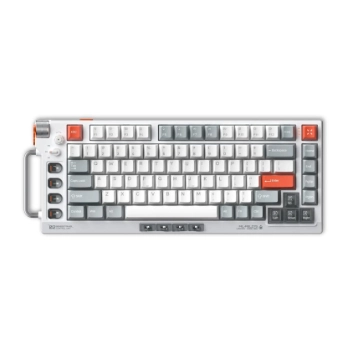
The NuPhy Field75 HE brings hall effect performance to the 75% form factor with a design that’s unlike anything else on this list. The dieselpunk aesthetic — dual metal knobs, macro keys flanking the board, a volume wheel tucked in the corner — either appeals to you immediately or doesn’t. I find it refreshing in a market full of identical-looking boards.
Performance-wise, it punches well above its price. You get 8,000 Hz polling, rapid trigger, adjustable actuation from 0.1 to 4.0 mm, and eight macro keys. The aluminum build feels solid. For the $150–$179 price range, the raw gaming specs rival boards costing $50–$80 more.
The catch: The software needs work. Factory resets and firmware updates have been known to wipe custom settings — actuation points, macros, RGB profiles, everything. It’s a frustrating experience when you’ve spent time dialling in your perfect setup. NuPhy has been improving this with updates, but it’s something to be aware of. The typing score also sits lower than dedicated productivity boards — this is gaming-first.
Best Budget Hall Effect: Gamakay × NaughShark NS68
Price: ~$44 Layout: 65% (68 keys) Switches: Hall Effect Connection: Wired USB-C Polling Rate: 8,000 Hz
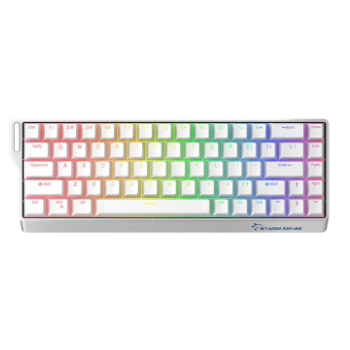
This is where the hall effect price barrier finally shatters. For around $44, you get 8,000 Hz polling, rapid trigger with 0.01 mm resolution, and Snap Tap (SOCD) — the same core features found in boards four to five times the price.
The 65% layout keeps arrow keys while dropping the function row and numpad, which makes it compact enough for low-sensitivity gaming setups where desk space is precious.
I want to be clear about what $44 gets you: the switch technology and polling rate are genuinely competitive with premium boards. The build quality, keycap material, and software experience are not. ABS keycaps will develop shine over time. The case is lightweight plastic. But for a first hall effect keyboard, or for someone who wants to try rapid trigger without a $200 commitment, this is the entry point that didn’t exist before.
The catch: The 65% layout drops the function row entirely, which is a dealbreaker if you rely on F-keys for work or specific game bindings. The software is basic. And the overall build feels like a $44 keyboard. But the switches? The switches perform like a $200 one.
Suggested Read: Best Barbeque Grills For Your Outdoor Parties At Home
Best Budget Mechanical: Keychron C3 Pro
Price: ~$44 Layout: TKL (87 keys) Switches: Gateron G Pro Red Linear (Hot-swappable) Connection: Wired USB-C Polling Rate: 1,000 Hz
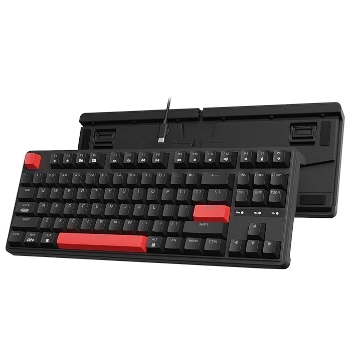
Not everyone needs hall effect switches or rapid trigger. If you want a reliable, well-built mechanical keyboard with serious customisation potential, the Keychron C3 Pro delivers remarkable value at $44.
The standout feature here is QMK and VIA support at this price point. That’s genuinely rare. You can remap every key, build custom layers, and program macros — the same firmware capabilities found in keyboards costing four or five times more. For a developer or power user on a budget, this is significant.
Hot-swappable sockets mean you can experiment with different switches as your preferences evolve. Start with the smooth Gateron G Pro Reds, then try tactile browns or silent switches later — no soldering required.
The TKL layout retains the function row and arrow keys while dropping the numpad, which strikes a good balance between desk space and functionality. Mac and Windows compatibility is built in.
The catch: It’s wired only, the keycaps are ABS (not PBT), and there’s no RGB — just single-colour backlighting. The 1,000 Hz polling rate is standard but not bleeding-edge. These are reasonable tradeoffs for the price.
Best Ergonomic: ZSA Voyager
Price: ~$365 Layout: Split columnar (52 keys per half) Switches: Kailh Choc V2 Low-Profile (Hot-swappable) Connection: Wired USB-C Polling Rate: 1,000 Hz
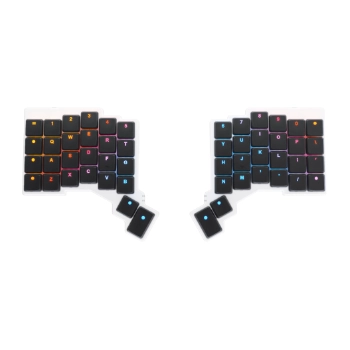
If you spend eight or more hours a day at a keyboard and you’ve started noticing wrist strain, shoulder tension, or outright pain, a split ergonomic board isn’t a luxury — it’s an investment in your ability to keep working.
The ZSA Voyager takes a fundamentally different approach to keyboard design. Each half sits independently on your desk, so you can position them at whatever width matches your natural shoulder alignment. The columnar key layout — where keys stack vertically rather than staggering like a traditional board — reduces the lateral finger stretching that contributes to repetitive strain injuries.
ZSA’s Oryx configurator is the best layout customisation tool I’ve seen. It’s visual, browser-based, and lets you build layers, tap-hold behaviours, and macros with a drag-and-drop interface. The learning curve for a columnar split board is real — expect a week or two before you’re back to normal speed. But once you adapt, the comfort difference is dramatic.
The Voyager is also the most portable split board on the market. It’s thin, light, and comes with a travel case. If you work from different locations, this matters.
The catch: $365 is a lot. The 52-key layout means heavy reliance on layers — there’s no numpad, no function row, no dedicated arrow keys. Everything is accessed through key combinations. And that learning curve is genuine. But for developers and writers who type all day, this is the board that can keep your hands healthy for years. Also check out the Keychron Q11 if you want a split design at a lower price point with a more traditional row-stagger layout.
Best for Quiet Office: Logitech MX Mechanical
Price: ~$150 Layout: Full-size (with numpad) or Mini (75%) Switches: Low-Profile Tactile / Linear / Clicky Connection: Bluetooth / Logi Bolt USB / USB-C wired Polling Rate: Not prioritised (office-focused)
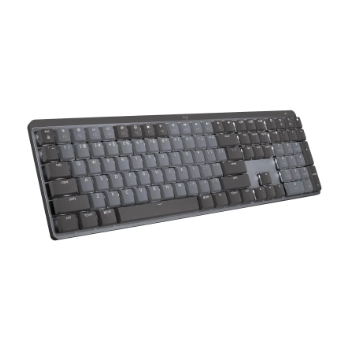
Sometimes you need a keyboard that won’t annoy your coworkers. The MX Mechanical exists for exactly that scenario — a proper mechanical keyboard designed for shared workspaces and video calls where clacking switches would be disruptive.
The low-profile switches deliver tactile feedback without the travel distance or noise of standard mechanical keys. They’re a meaningful upgrade from membrane boards while staying office-appropriate. The typing feel won’t satisfy a keyboard enthusiast, but it will satisfy someone who types all day and wants something better than mushy rubber domes.
Where the MX Mechanical really earns its place is the productivity software integration. Logitech Options+ lets you assign per-app macros, control media, and switch between three paired devices instantly. You can move between your work laptop, personal machine, and tablet with dedicated buttons. Logitech Flow even lets you drag files between computers seamlessly.
The catch: This is not a gaming keyboard. The low-profile switches, office-oriented polling rate, and Bluetooth-first design make it unsuitable for competitive play. The keycaps are ABS and will develop shine. But for its intended purpose — quiet, comfortable, multi-device productivity — it does that job exceptionally well.
Buyer’s Guide: What Actually Matters When Choosing a Mechanical Keyboard
The specs sheet for a modern mechanical keyboard can be overwhelming. Here’s what genuinely matters, and what’s mostly marketing.
Hall Effect vs Traditional Mechanical Switches
This is the biggest shift in keyboard technology right now. Traditional mechanical switches use a physical metal contact to register keypresses. Hall effect switches use a magnet passing over a sensor — no physical contact at all.
The practical benefit is adjustable actuation. With a hall effect board, you can set exactly how far a key needs to travel before it registers — from a feather-light 0.1 mm to a deliberate 4.0 mm. Traditional switches have a fixed actuation point, typically around 1.5–2.0 mm. You can’t change it.
Hall effect switches also enable rapid trigger, which dynamically resets the key based on upward movement rather than requiring return to a fixed reset point. For competitive FPS gaming, this provides measurably faster counter-strafes and direction changes.
Do you need hall effect? If you play competitive FPS games, yes — the advantage is real. For everything else — casual gaming, typing, productivity — traditional mechanical switches are perfectly fine and often provide a better typing feel.
Switch Types: Linear, Tactile, and Clicky
Linear switches move straight down with no bump or click. They’re the default choice for gaming because they allow the fastest repeated keypresses. Examples: Cherry MX Red, Gateron Red, Razer Yellow.
Tactile switches have a small bump partway through the keypress that tells your finger the input registered. Many typists prefer this feedback. Examples: Cherry MX Brown, Gateron Brown, Holy Panda.
Clicky switches add an audible click sound to the tactile bump. They’re satisfying to type on and terrible in shared offices. Examples: Cherry MX Blue, Kailh Box Jade.
For gaming, I’d lean linear. For typing-heavy work, tactile. For annoying your coworkers, clicky.
Keyboard Layouts Explained
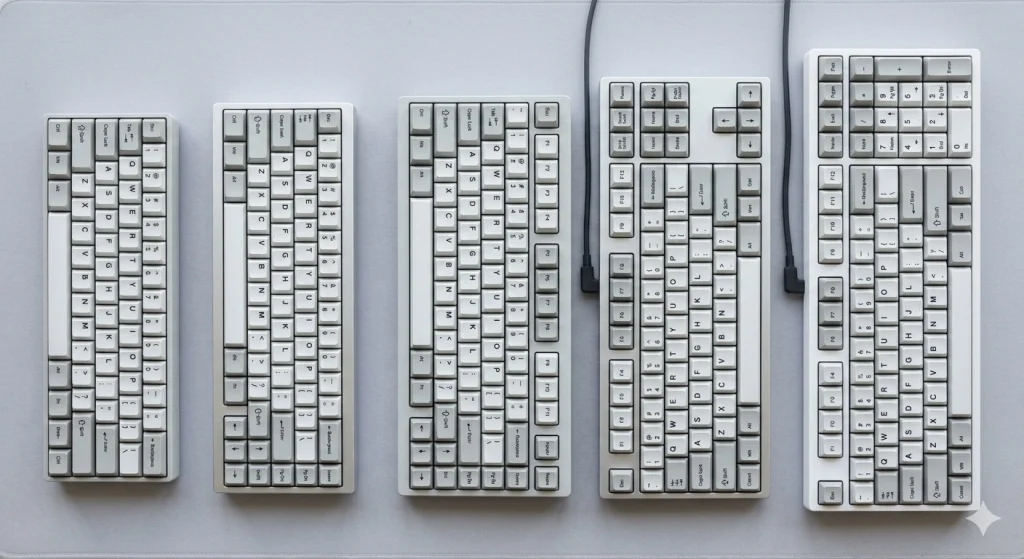
| Layout | Keys | What You Lose | Best For |
|---|---|---|---|
| Full-size | 104 | Nothing | Data entry, spreadsheets, numpad users |
| 96% | 90–100 | Some spacing between key clusters | Productivity + gaming combo |
| TKL | 87 | Numpad | Gaming (more mouse space) |
| 75% | 82–84 | Numpad + most navigation keys | Compact gaming and travel |
| 65% | 67–68 | Numpad + function row + navigation | Maximum desk space |
| 60% | 61 | Everything except alphas and modifiers | Extreme minimalists |
My recommendation: 75% or TKL for gaming. 96% if you need a numpad for work. Full-size only if you genuinely use the numpad daily.
Wireless vs Wired: Does It Matter?
Modern 2.4 GHz wireless connections have caught up to wired for gaming. The latency difference is functionally imperceptible at 1,000 Hz polling. Every major review outlet has confirmed this.
Bluetooth is a different story. It introduces 10–30 ms of variable latency, which makes it unsuitable for competitive gaming. It’s fine for typing and office use.
Wired remains the only option for keyboards running at 8,000 Hz polling rates. The current USB wireless protocols can’t sustain that data throughput. So if you want the absolute fastest input, you’re still plugging in a cable.
Hot-Swappable Switches
A hot-swappable keyboard lets you pull out switches and pop in new ones without soldering. This matters for two reasons: you can replace a single broken switch instead of the whole board, and you can experiment with different switch types as your preferences change.
Look for 5-pin hot-swap sockets — they’re compatible with the widest range of aftermarket switches.
Polling Rate: How Much Do You Actually Need?
Polling rate is how many times per second the keyboard reports its state to your computer. Higher numbers mean your keypress is detected faster.
1,000 Hz (1 ms response) is the competitive standard. Every keyboard on this list meets or exceeds it.
8,000 Hz (0.125 ms response) is the current frontier. Is the difference between 1 ms and 0.125 ms noticeable to a human? For the vast majority of players, honestly no. But for professional-level competitive play where margins are razor-thin, it provides a measurable advantage.
Don’t let a keyboard’s 4,000 or 8,000 Hz polling rate be the deciding factor unless you’re competing at a high level. At 1,000 Hz, the input delay is already below human perception thresholds.
Gasket Mount, Sound Dampening, and Acoustics
The mounting system determines how the switch plate connects to the keyboard case, and it dramatically affects both sound and feel.
Gasket mount suspends the plate on flexible silicone or rubber gaskets, absorbing impact and producing a softer, deeper sound. This is the gold standard in modern keyboards. Tray mount screws the plate directly to the case — stiffer, louder, cheaper.
If sound profile matters to you, also look for boards with case foam, switch pads, or PE foam layers between the PCB and plate. These dampen higher-pitched sounds and reduce hollow acoustics.
QMK/VIA Support: Why Programmers Care
QMK and VIA are open-source firmware platforms that let you customise your keyboard at a fundamental level — key remaps, layers, macros, tap-hold behaviours, and more. The customisation runs on the keyboard’s onboard processor, not through software on your computer.
This means your layout follows the keyboard, not the machine. Plug it into any computer and your custom configuration is already there. For developers who work across multiple machines, this is a significant advantage over proprietary software-based customization.
Frequently Asked Questions
Is a mechanical keyboard really worth the price over a membrane keyboard?
Mechanical keyboards offer tangible advantages that justify the price difference for heavy users. Individual switches provide consistent actuation across every key, tactile or audible feedback per keypress, and durability rated for 50–100 million actuations versus 5–10 million for membrane. If you type or game for several hours daily, the improved accuracy and comfort add up quickly. Budget mechanical boards now start around $44, which makes the entry point lower than ever.
What is rapid trigger and do I need it?
Rapid trigger is a feature exclusive to hall effect and analog optical keyboards that dynamically resets a key based on upward movement rather than requiring the key to return to a fixed point. In competitive FPS games, this allows faster counter-strafing and direction changes — the key re-registers the moment you reverse direction. If you play ranked FPS games competitively, rapid trigger provides a real advantage. For casual gaming, typing, or productivity, you won’t notice or benefit from it.
Should I buy a hall effect keyboard or a traditional mechanical one?
Hall effect keyboards are superior for competitive FPS gaming thanks to rapid trigger, adjustable actuation, and magnetic switches that never wear out. Traditional mechanical keyboards generally provide a better typing experience, offer far more switch variety (hundreds of options versus a handful), and are available at lower price points. If competitive gaming is your priority, go hall effect. For everything else, traditional mechanical switches offer more choice and often better value.
Is wireless good enough for gaming now?
Modern 2.4 GHz wireless keyboards have reached parity with wired connections for gaming at 1,000 Hz polling rates. The latency difference is below human perception. Bluetooth, however, still introduces 10–30 ms of variable delay and remains unsuitable for competitive play. The one caveat: if you want 8,000 Hz polling for the absolute fastest input, wired is currently the only option.
Which keyboard layout should I choose?
Layout depends on your primary use case. For gaming, 75% or TKL gives you more desk space for mouse movement while retaining essential keys. For productivity work that involves numbers or spreadsheets, 96% keeps the numpad in a compact footprint. Full-size is only necessary if you use the numpad constantly. Start with TKL if you’re unsure — it’s the most versatile compromise.